Earlier this year, when software stocks were taking a beating related to the heights of AI enthusiasm, a client reached out to me for my opinion on whether AI might be used by domain experts, such as myself, to create competing products capable of supplanting established software firms like Advent and others at a fraction of the price due to a lower cost base.
At the time, I acknowledged that it was possible, but more likely to happen at smaller firms. Investment professionals are stereotypically risk-averse in their business practices and the production software they utilize to run their businesses. While the largest investment firms are better suited to tolerating risk from a resource standpoint, they are also the least likely to take on what they might consider unnecessary risk. As a result, larger firms as a whole are slower to replace mainstream products with upstart offerings that have an unproven track record.
However, a more likely possibility has emerged: firms currently running vendor software—motivated by the costs and limitations of those products—may simply create their own systems using AI to aid them in the process. I have already seen signs that some firms are doing this and feel comfortable doing so. I am not necessarily recommending it, but I understand the motivation.
If you are paying substantial fees for systems you believe you could replace, why wouldn’t you? The key here is understanding what these systems actually do. A vendor with a forty-year track record has built a product that almost certainly handles details that an AI-assisted or ‘vibe-coding’ alternative (with a relatively short window of development and testing) does not; however, that may not matter much if you are only looking for 60% to 80% of the functionality of the product you are replacing.
When I compare products in the investment space, there are clear differentiators between older-class solutions and newer-class solutions. Those differentiators once would have represented a significant hurdle for a competing product to match, but AI makes it much easier.
As an example, consider the HTML attachment below, which summarizes hypothetical investments for a fictitious company and client in a format typical of newer-class solutions. I used Claude to help me produce this last month. This is something I could have done previously if a prospective client had asked me to, but I was never tempted to do so because it would have been tedious and time-consuming to perform manually. With the assistance of frontier AI models, I was able to achieve the following result, which can easily be populated from portfolio accounting data within Axys or APX. Please note that all reporting exhibits in this blog were produced using Anthropic, OpenAI, and Perplexity models and based on fictional data; disclosures on each exhibit also restate this.
The prompt was the result of a test I performed one afternoon where I asked the best-known publicly available frontier models in the cloud, as well as the best local models I can run on my Alienware Area-51 desktop, to create what I consider to be a decent report package by today’s standards. I would love to take more credit for it, but I cannot; I simply asked Claude to do it and it was done. Perplexity also did a respectable job, though it fell slightly behind Claude’s effort, while ChatGPT’s report was clean but relatively simplistic.
The local models didn’t put up much of a fight, although I may be able to improve their performance by using frontier models to design the prompts for them. It would be nice to rerun these tests using GLM-5.3 Q4 or GLM-5.3-Flash on a Mac Studio with an M5 Ultra chip and 512GB of unified memory, but I don’t have one of those yet. Naturally, if you write better prompts than I did or possess superior hardware, your results may vary.
Claude didn’t just create a pretty mockup of data in HTML like ChatGPT and Perplexity; it created JSON blocks within the HTML that I can populate programmatically from data feeds I have already created using xPort with Axys and APX. If I wanted to build an alternative system, I would be well on my way with this type of reporting right out of the gate.
Here is what I produced with Perplexity’s assistance.
The pros and cons of building versus buying remain. AI can potentially help you maintain the code, but will your staff truly understand everything they are using? Probably not. And what will it cost to maintain that code in the future? If the system is predominantly AI-coded and not fully understood by those at your firm, that cost will be determined by the “AI gods” in power at the time.
Can a true domain expert with deep knowledge of specific software utilize local and/or frontier models to build a competing system in a fraction of the time and cost required years ago? Yes. Absolutely—and every day, it is becoming more feasible.
About the Author: Kevin Shea is the Founder and Principal Consultant of Quartare; Quartare provides a wide variety of agile technology solutions to investors and the financial services community at large.
For details, please visit Quartare.com, contact Kevin Shea via phone at 617-720-3400 x202 or e-mail at kshea@quartare.com.
As a technology consultant specializing in automation and integration of all things Advent, I have helped hundreds of firms make the financial reports and statements they envision a reality. In the past, those projects may have been slowed to some degree by the more obvious technical challenges: creating the mockups, subsequent report development, and testing/validation, but those aren’t the only things that make revamping statements time-consuming.
This statement mockup was created in about five minutes using Claude. No data provided here is real.
It is also what occurs within an organization as a precursor to any possible statement redesign and in tandem with an ongoing statement redesign that takes time. Changing statements requires that principals buy into the idea and believe that changing the statements, which very likely have been in use for many years, is a priority. Statement redesign doesn’t happen in a vacuum. Along the way, a lot can happen. These types of projects can be put on hold, as firms planning to update their reports may also be considering changing to another platform that might offer better reporting as a feature.
There are several factors that go into choosing a new platform, and I wouldn’t make a generalized recommendation related to that. However, if moving to a new platform is primarily about improved reporting, it is prudent to see what you can do with your existing platform before you change it.
Historical Mockups
Over the years, I have been provided with an assortment of exhibits cut out from other firms’ reports, sketched approximations of what the reports should look like, and entire report packages from other firms with a request to reproduce them. In the past, mocking up reports was something that could take hours or days. If a client didn’t already have something very specific in mind, I would provide them with report samples to review. Working from those samples as general ideas of what we could do, clients would create mockups of the reports they wanted.
Today, creating your next-generation report packages can be quicker than ever thanks to a wide variety of AI tools that are well-suited to the task. In some cases, you can create presentation-quality mockups in minutes. AI should not be used as a substitute for creative human thought and ingenuity, but working with AI tools undoubtedly speeds the process of taking your ideas and transforming them into a presentation-quality visualization that can be shared with your peers.
When done with the proper approach, tools, and infrastructure in place, you can go from having mockups to having live reports you can use in a fraction of the time it would have taken years ago, and you don’t need to change your PMS platform from Axys or APX to get these types of reports.
Data and Reporting Processes
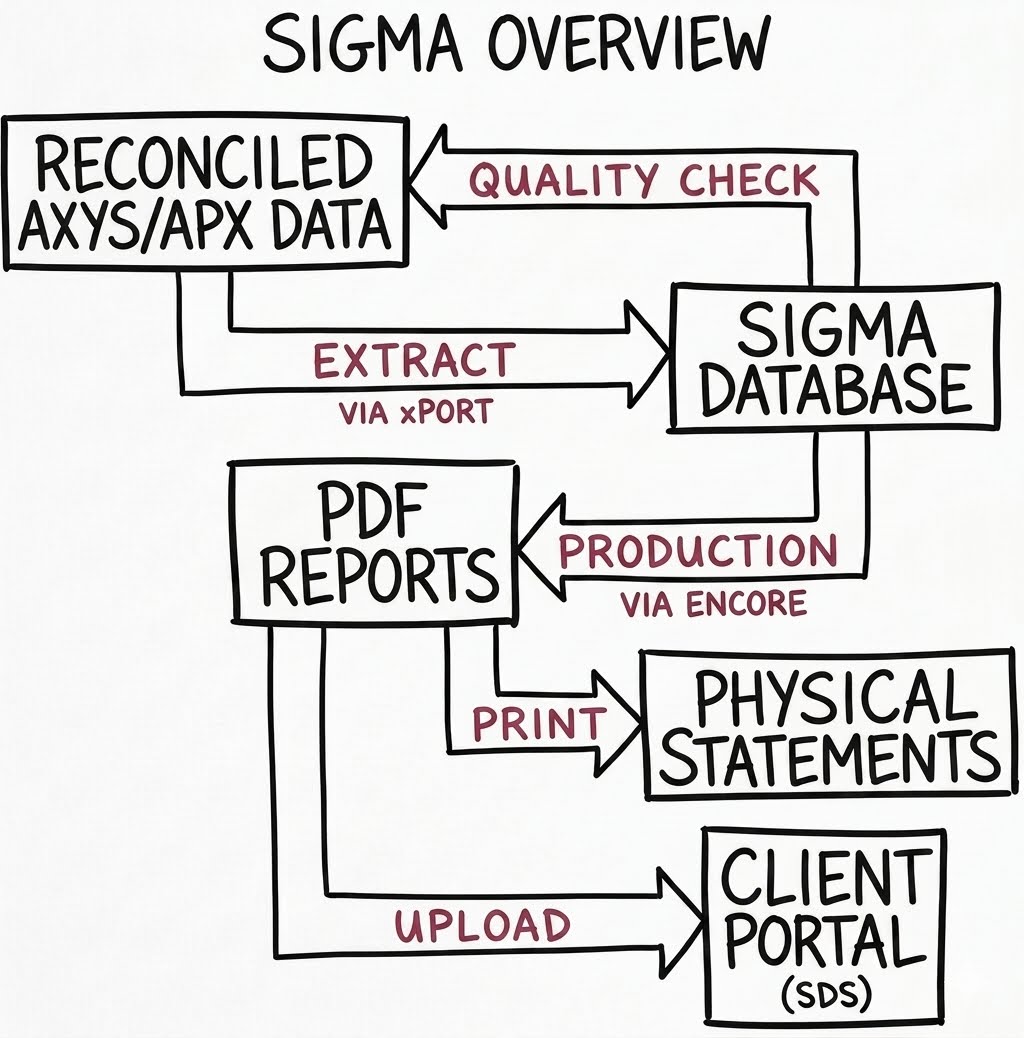
The key is having the underlying data from Axys or APX in a modern data warehouse and access to qualified tech resources to update any additional queries and data feeds you may need for the reports you want to design. That infrastructure, along with workflows that leverage it, empowers you to own your data and reporting processes. The image below illustrates my chosen approach to providing high-end investment reporting solutions to investment professionals for many years.
Next Gen Reports
While that fundamental approach hasn’t changed, the way we create reporting solutions has transformed with improvements in the technology available to us. Traditional report-writing tools could certainly be used to develop reports that are first produced as mockups, but it is no longer necessary. Instead, we can simply prompt the AI tool of our choice to create a program to populate the reports.
So long as you have the Advent data necessary to produce the reports in an acceptable database format, you should be able to populate the new reports almost immediately. If you don’t have the necessary Advent data in a data warehouse yet, that process has also never been easier than it is today. Advent subject matter experts like myself should expedite that process significantly and ensure that the data extracted is correct, but once again, AI tools are making ETL and data warehouse projects much easier than they have been in the past.
That said, pulling the data en masse is a larger, more complex project that, for now, may still be best left to those with specific expertise doing it. A data warehouse isn’t just a bunch of tables. The structure of the tables, queries, and relationships between them facilitates your ability to create additional queries and reports more efficiently.
Reports like the Portfolio Statement included in this blog are just a sample of what is possible. If you can imagine it and create a detailed system prompt describing what you want, AI tools like Claude can help you make it a reality.
There really is no time like the present to update your client statements.
About the Author: Kevin Shea is the Founder and Principal Consultant of Quartare; Quartare provides a wide variety of agile technology solutions to investors and the financial services community at large.
For details, please visit Quartare.com, contact Kevin Shea via phone at 617-720-3400 x202 or e-mail at kshea@quartare.com.
In previous articles, I have written about the ability to take an Advent Report Writer report and make changes to it in the underlying REPLANG code. Though the program is actually called Report Writer Pro, I won’t be referring to it by that name since the “Pro” part seems a bit much.
In this article, I will take you through the basics of this process and also share some code I wrote recently to deal with a troublesome Report Writer exception. Please note, there are many modifications that can easily be done within the Report Writer interface, but this article is not about that.
You should have a good reason for attempting to modify Report Writer reports outside of the app. For me, two fundamental issues drive this decision. The modification either cannot be handled due to limitations of Report Writer or it is simply much more expedient to hack and slash REPLANG than it is to work within the confines of the Report Writer environment.
Okay. Let’s assume that like me you think you have a good reason to do this. There are a few things you should know before you modify a report created by Report Writer outside of Report Writer. First of all, any report created in the Report Writer has a RPW extension, but the underlying format is REPLANG. In most cases, any report with a REP extension was not created by Report Writer – except of course for reports like the ones we are talking about creating.
Second, your report containing code not created by Report Writer can no longer be modified by Report Writer in the future, so make a backup of the RPW file before any changes, and save the file you modify as a REP file. That way if you need to make a change to the report later – that Report Writer would be better suited to make – you can. In that scenario, once you have updated the report you can reapply your manual updates to the newer RPW file and then save it as REP report again.
The reason that your new REP report cannot be modified in Report Writer is not only due to the fact that the extension isn’t an RPW, but more specifically that a checksum created by Report Writer when it was last modified by the software will no longer match. The logic behind why this is done is understandable. Report Writer only works with certain predefined templates and does some really impressive things, but it is not designed to interpret code changes that were not created by Report Writer.
Lastly, if you haven’t waded into REPLANG code created by Report Writer it will take some getting used to. By nature of the fact that RPW files are created to be extensible the REPLANG code is more abstract. In other words, the code generated by Report Writer appears far less direct with regard to its purpose than code that an individual might write for a singular and well-defined purpose. If you are not familiar with REPLANG coding, I wouldn’t recommend trying to modify REPLANG reports created by Report Writer.
Some examples of the types of things I find myself doing when I modify Report Writer reports from REPLANG directly follow:
I need to do a calculation that I find difficult or impossible within the Report Writer interface. If you have any experience using Report Writer to create user-defined formulas, this really isn’t that hard to imagine.
Adding a piece of data that isn’t readily available from the Report Writer.
For expediency sake, I know how to do something in REPLANG in a minute, but doing it in Report Writer might take an unreasonably long time.
Dealing with Report Writer Exceptions
Recently, while working on some reporting extracts for a client, I attempted to take what appeared to be a relatively simple Report Writer report and change the format to a CSV file. Doing so is a basic function of the product and only requires a few mouse clicks. It is something I tend to do on a regular basis and it usually works well. However, this time Report Writer went haywire.
Instead of taking the twenty-two thousand line report and making another similar sized report as I expected, it created a ridiculously long report (hundreds of thousands of lines of code) that Report Writer could not test or run. Even a twenty-two thousand line report sounds big and it is. By comparison, the longest standard report(persave.rep), which updates performance files, is under four thousand lines. Most of the standard reports are significantly less than a thousand lines of code.
It is not the first time I have seen this problem, but this time I decided to do something more proactive to deal with this issue in the future. The report that I was attempting to change is fairly simple. There are no summary records. So, the output is just a table of detail records and that helps to simplify the coding requirements of what I want to do. To deal with this issue in the past, I have simply renamed the RPW to a REP file and modified 10 to 20 lines specific to placing the output on the screen and reformatted them to be CSV friendly.
There are alternative ways to do this. You could create the Excel file output manually by exporting the report output to Excel once the report has been generated and saving it, or by writing a script to generate an Excel file, but in this particular instance I preferred to create a more flexible CSV report. We could also do a standard search and replace function within a text editor, but having seen this issue more than a few times I wanted to create a utility I could use going forward.
So I quickly wrote the code in the section below to change the original report, which was sending output to the report view screen, to send all the output directly to a file. I find it very easy to code things like this using Visual Basic (VB) or Visual Basic for Applications (VBA). Since most users also have access to VBA via Microsoft Office, it is a programming option you can find and use on almost any PC. As such, I frequently use VBA when I am doing spontaneous and simple coding tasks or projects that don’t require a more complex development environment. I am not a huge fan of verbose comments, but I thought they might be useful here.
VB
SubMAIN()' This routine takes a REPORT WRITER report which sends output to the' screen and creates a report that sends output to a file. The routine' was created to address an exception where the normal function to make' a change in a RPW file created an obscenely large Report Writer file' that couldn't be tested or run.' written in VBA by Kevin Shea (aka AdventGuru) & published 06/26/2019' Disclaimer: This routine works fine for the specific instance it was' created for, but could need additional modifications for different' circumstances.'Initialize variablesDim InputFileHandler AsIntegerDim OutputFileHandler AsIntegerDim Filename$Dim Record$Dim IgnoreRecords AsBooleanDim ReportLocation$Dim OutputFolder$ReportLocation$="f:\axys3\rep\"OutputFolder$="f:\axys3\exp\"' Axys users will probably need to change the two locations above to' match their actual folder locations of Axys.' APX users, depending on the APX server name, the preceding statements' might need to change to ReportLocation$="\\apxappserver\APX$\rep\"' and OutputFolder$ = \\apxappserver\APX$\exp\"InputFileHandler= FreeFile'fetch an unused file handlerIgnoreRecords= FalseFilename$=InputBox("Report file name?")Open ReportLocation$+ Filename$For Input As #InputFileHandlerOutputFileHandler= FreeFile'fetch an unused file handlerOpen ReportLocation$+ Left$(Filename$, Len(Filename$)-4)+".out"For Output As #OutputFileHandlerDoWhileNotEOF(InputFileHandler) Line Input #InputFileHandler, Record$'read a record from the reportIfLeft$(Record$, 4)="head"ThenIgnoreRecords= Not(IgnoreRecords)' REPLANG marks the beginning of the header definition with the' statement "head" and ends the header definition with the same' statement. We don't want to write the header to our output file,' so we are going to ignore all of the code between the two head' lines of code.IfIgnoreRecords= FalseThenIfInStr(Record$, ".")>0Then' The "." in REPLANG is the syntax usually associated with' sending output to the screen most, but not all, "." lines' end with "\n", which marks the end of the output line. By' making the "." a requirement of this logic we will only' process REPLANG statements that create output.Fori=1ToLen(Record$)'ignore any code lines that are less than two charactersIfi>1Then' We may not need to be this specific, but I want to err' on the side of caution. We will only process lines that' start with a period. This prevents us from processing' other lines that may have periods in the remarks or other' areas of the REPLANG report.IfTrim$(Left$(Record$, i-1))=""AndMid$(Record$, i, 1)="."Then'Somewhat self-explantory... Record$=Replace(Record$, "~", ",") Record$=Replace(Record$, "#,", ",#") Record$=Replace(Record$, " ,", ",") Record$=Replace(Record$, "?", "") Print #OutputFileHandler, Record$'write the record we modifiedExit For'Exit logic early if we are done processing the record.End IfEnd IfNext iElse' This bit of code inserts the code that writes all records' that weren't modified, but contains some minor code insertion' (outfile) make the output go to a file. The proper place to' insert the outfile statement is before any accounts are' processed, which is immediately before the load cli statement.' Writing to a file requires that we close (fclose) the file' or the result will not get written properly. The right place' to insert the fclose statement is when all of the processing' has been completed, which is immediately after the next cli' statement.IfLeft$(record, 8)="load cli"Then Print #OutputFileHandler, "outfile "+OutputFolder$+"outfile.csv n" Print #OutputFileHandler, Record$Ifrecord="next cli"Then Print #OutputFileHandler, "fclose"End IfEnd IfLoopClose #OutputFileHandlerClose #InputFileHandlerEnd Sub
Expand
As to why Report Writer erroneously attempts and fails to create such a long report, it likely has something to do with user-defined calculations and parsing of strings. However, for the purpose of this article we are not trying to fix that issue. It may just be a limitation of the Report Writer.
About the Author: Kevin Shea is the Founder and Principal Consultant of Quartare; Quartare provides a wide variety of technology solutions to investment advisors nationwide. For details, please visit Quartare.com, contact Kevin Shea via phone at 617-720-3400 x202 or e-mail at kshea@quartare.com.
Earlier this year, Advent sent an alert to Axys users about Windows 8 issues and how to deal with them, as an interim solution to problems that Windows 8 users can face. It is good that Advent is proactively alerting users, but I am not recommending that any of my clients move to Windows 8 just yet. Upgrading your office to Windows 8 is premature, unless you are willing to pay the premium and deal with the frustrations typically associated with being an early adopter of the latest Windows operating system.
If your firm uses Axys, you may be wondering whether a new release is in the works. Though Advent hasn’t publicly set a release date for the next version yet, I expect they soon will. Based on what Advent has done in the past, users should expect a 3.9 release in the near future. That release will likely support Office 2013, and Adobe Acrobat 11, and may also feature improved Windows 8 compatibility.
Though these types of updates seem minimal, they have more substance than you might think. Axys remains a very functional and cost-efficient option for advisors. Compound reports generated in Axys 3.8.5 using Excel 2010 graphs rival output from APX at a fraction of the cost. If your compound reports look dated, find out what version of Excel you are using. Using the latest version of Excel in conjunction with a version of Axys that supports it can give your reports a newer look and feel.
Axys 4?
I would like to think that Axys 4 is in the works, but a major revision would probably mean a name change – perhaps “Cloud Axys?” Longer-term, expect Axys to undergo a technology transformation if Advent wants to keep the platform alive and decides to commit greater resources to future updates that keep pace with technology trends. While the number of APX, Geneva and Black Diamond users have continued to grow, Axys users still account for a considerable number of Advent’s clients.
Historically, Axys was the lynchpin of Advent Software’s success and center of their hub of solutions for their customers. Replacing the PMS of an investment advisor is more complicated than it seems. It impacts many of the systems at an advisor’s office, as well as the people you need to support your business, the skills they need, and what third-party solutions are available.
It would be ideal for Advent if Axys customers moved to another Advent product in the future. Those conversions and newer software licensing agreements would generate more income, while eventually allowing Advent to phase out Axys without major renovations. However, Axys users looking at APX, Black Diamond and Geneva don’t always see a clear path.
In the past two years, Tamarac/Envestnet and other competitors have won over some Axys customers. My firsthand knowledge of a couple of advisors who made the move to Tamarac leads me to believe that Advent didn’t need to lose these customers. Through better communication, negotiation or product positioning, they could have kept the business. On that note, I spoke with an Axys user last week that requested an APX quote after seeing a demo in Q2 and never got one.
Perception is Reality
“Be where your enemy is not.” -Sun Tzu
Current Axys users represent a ground of contention that will not be ignored by Advent’s competitors and should not be ignored by Advent. At stake is the perception of who provides the very best PMS platforms for investment advisors. Advent may be willing to let some of their Axys clients go quietly, but in doing so they risk losing those relationships long-term, if not permanently, as well as other advisors in their sphere of influence. Axys users represent a critical mass that could fuel the growth of Advent’s competition in the near future. Left unchecked, Advent competitors garnering Axys users now could ultimately vie for current APX, Geneva, and Black Diamond users down the road.
Obviously, Advent cannot be all things to all customers, but they can make a better effort to keep existing Axys clients in the fold. In order to do so, Advent must improve communications with Axys users, affirm their commitment to Axys, and continue to add technology enhancements to Axys on a regular basis.
–
About the Author: Kevin Shea is President of InfoSystems Integrated, Inc. (ISI); ISI provides a wide variety of outsourced IT solutions to investment advisors nationwide.
For details, please visit isitc.com, contact Kevin Shea via phone at 617-720-3400 x202 or e-mail at kshea@isitc.com.


 About the Author: Kevin Shea is the Founder and Principal Consultant of Quartare; Quartare provides a wide variety of agile technology solutions to investors and the financial services community at large.