Category: Featured


black coffee,glasses and newspaper on business fileI have been talking about the evolution of investment reporting for years and telling anyone who would listen that their clients will soon have other investment reporting options.  My dream or vision of the future includes me (of course) providing the interface to facilitate getting data from financial services firms to a secure data warehouse via xPort where their clients could download the data for analysis on an open reporting platform.

As I discussed this with one of my clients at a recent Schwab conference, they shared their concerns with me.   I was told, “It’s basically a problem of apples and oranges.”

My long-time client and friend explained to me that they would have concerns that data they reviewed and corrected (“apples”) might be reported as uncorrected data (“oranges”).

Though data aggregators exist and have much of the data required, they won’t have it all unless advisors participate and cooperate in the process.  Reconciliation needs to be performed and maintained on an ongoing basis with respect to assets under management, inception-to-date performance, and tax cost.  No one is more motivated and qualified to maintain that data integrity than the advisors whose decisions, service, and bottom line are impacted by the quality of that data.

Big Brother will have access to this data too – that’s not part of my plan, but just a given eventuality and perhaps already a reality.  Regulatory powers will employ predictive analytics to proactively search for potential fraud.  For example, an advisor reporting the same exact composite return two years in a row is possible, but highly unlikely and worth investigating.  When more scrutiny is applied to this data, one can only hope that the benefits of additional regulation will outweigh the compliance headaches.

Enter SigFig

SigFigAccording to their web site, SigFig was born out of the noble desire to serve the millions of investors that don’t meet typical portfolio minimums and cannot afford quality investment advice.  Your clients may be using SigFig already.  If you haven’t seen it, SigFig is to investment reporting what Mint is to personal financial reporting.  Unfortunately for investment advisors, SigFig has a similar business model, meaning that investors do not pay for the service, but instead get solicited with offers that appear relevant to their investments; for example, “this fund is outperforming your fund “or “your investment advisor is overcharging you.”

Using SigFig, investors can view a dashboard summary of investment reporting information that looks better than what many investment advisors currently provide to their clients.  However, as one familiar the details of performance calculations, client billing, and reconciliation, I am naturally concerned about possible data quality issues.  The idea of replacing the sound advice of an investment professional with algorithms designed to place ads – even though those ads are intended to be unbiased – seems inherently flawed.

To learn more, you can check out SigFig here:

www.sigfig.com

In my preferred vision, advisors would pay an interface fee and their participating clients would purchase SAAS reporting or a Droid/iOS app.  Idyllic as it might seem, this version of the future would allow investment advisors and their clients to share views of reports created by impartial third-party reporting sources.

SigFig is a step in the right direction, and should serve as warning to investment advisors that more robust investment reporting information will be delivered to their clients whether they participate in the process themselves or allow their clients to find it on their own.

The Best Investment Reports

It makes perfect sense that your firm should want to provide the best reports possible to your clients, without incurring an unreasonable expense or maintaining an unmanageable reporting process.  Unfortunately, what’s best for your firm and what’s best your client may be two different things. You want to validate your investment methodology and highlight the value continued use of your firm offers, but you also need to keep your client’s best interests in mind.  More than one advisor I have worked with in the past has chosen to shy away from slick, eye-popping reports, instead favoring black-and-white reports where simple numbers alone underscore performance.  In the opinion of these advisors, the relationship with a client is more important than fancy reporting and such reports can distract investors.

Call modern reports a prudent best practice or self-serving marketing effort designed to ensure your firm’s survival.  The truth is that they are a little of both.  Clients expect decent reporting, so substandard reports are now passé.  Quarterly report packages like those I have helped clients create for twenty years are also known as presentations, and perhaps that is a better name for them.  It describes what investors are really trying to do at quarter end.
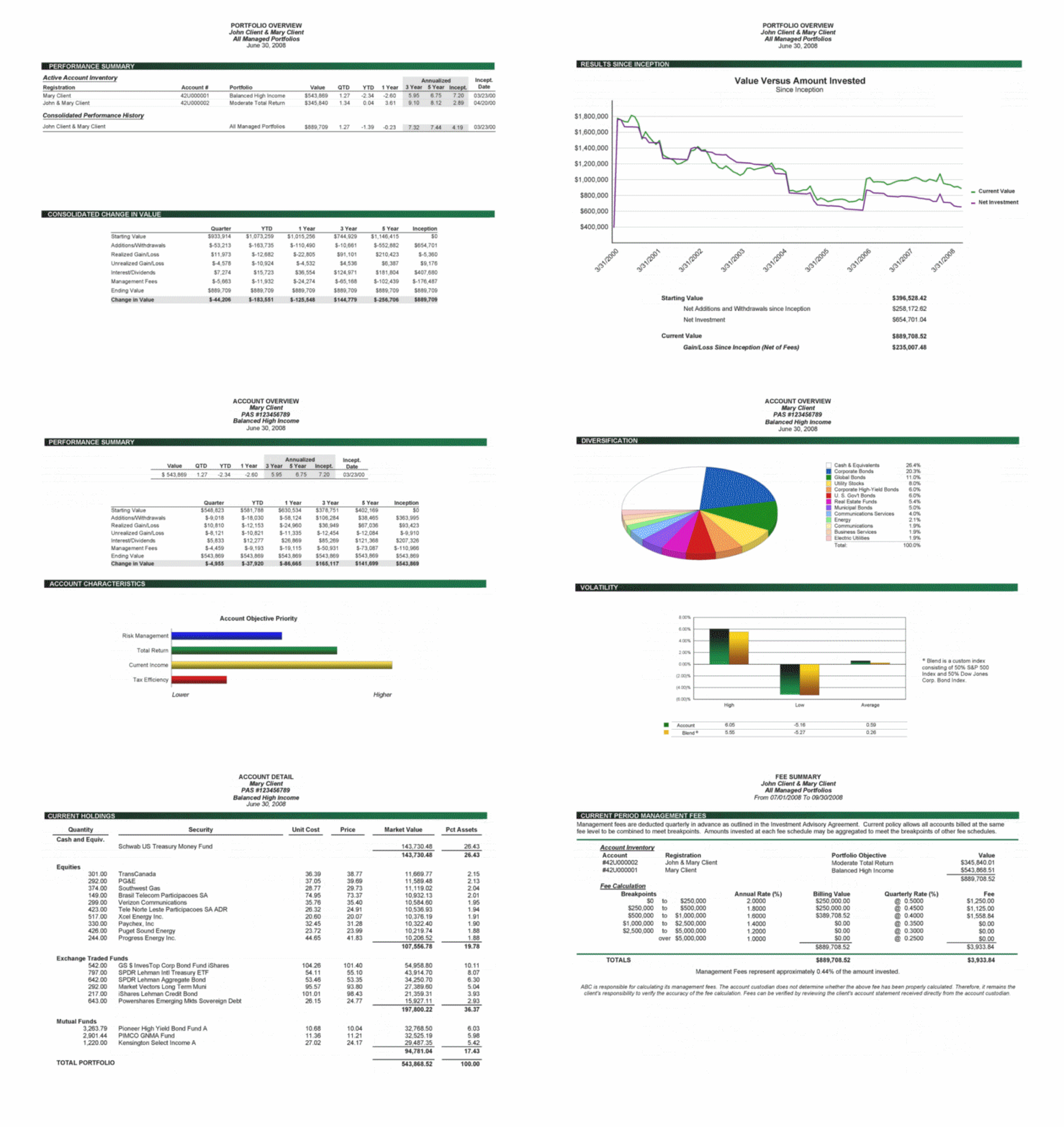
Sample Client Reporting Presentation

Sample Client Reporting Presentation

Every quarter, advisors have an obligation and opportunity to make a presentation of how their clients’ investments are doing.  Most advisors also write a quarterly letter in which they address the near-term market conditions and reasonable expectations for the future while trying to impart some relevant wisdom to their investors.  Advisors are, in fact, presenting and remarketing to their clients on a quarterly basis.  Good presentations typically illustrate an advisor’s general knowledge of the markets, educate clients, and show how the advisor adds value.  The reports included in these presentations also present holdings analyses that provide clients with additional insight into their investments, but, most importantly, these reports provide the client with performance figures and comparative benchmarks for various time periods.

Report Development or Adoption

For some firms, proprietary custom report writing is required to meet the needs outlined above.  With this requirement comes the necessity to employ staff or contract with vendors to produce and maintain the reports.  The effort to produce high-quality reports can be daunting whether the project is handled internally or outsourced.  Many custom reports, by definition, are in flux.  In a typical quarter, custom reports may undergo additional feature enhancements and require maintenance modifications or bug fixes.  In order to maintain custom reporting systems, an ongoing commitment of time and money is necessary.

Advisors may want to create distinct custom reports that are part of their brand, but given the potential complexity and cost of creating those reports – the best investment reports for those with limited funds are the ones that already exist.

–

About the Author: Kevin Shea is President of InfoSystems Integrated, Inc. (ISI); ISI provides a wide variety of outsourced IT solutions to investment advisors nationwide.

For details, please visit isitc.com, contact Kevin Shea via phone at 617-720-3400 x202 or e-mail at kshea@isitc.com.

iStock_000011255731XSmallWhen Advent first introduced The Professional Portfolio (aka Proport) 25 years ago, one feature that contributed  largely to its long-term success was the ability to get data in and out of the program easily.  Advent software has continued to make this feature a priority throughout every iteration of their original portfolio management product line.

In contrast competing products like Centerpiece, which would eventually be purchased by Schwab and rebranded Portfolio Center, appeared to be a black box.  You could see what was being calculated, but could not see the components of the calculation.

Proport files were stored in an open text format and could be easily read and written as necessary.  Axys v1.x, Advent’s premier Windows product at the time, maintained a similar open file structure.  Axys v2.x was the first version to implement a binary file format.  At the time, some users were concerned that the format change would complicate maintenance of existing customized solutions and inhibit their ability to continue to create solutions that exchanged data with Advent’s portfolio management system.

Firms were slow to embrace Axys v2.x and some never upgraded to it.  Perhaps it was concern over the new file formats.  Instead, most firms eventually upgraded to Axys v3.x. Concerns about the format change were moot since Advent also introduced IMEX, which allowed users to import and export files in CSV, tab, and fixed formats.

Exceptions apply, but the IMEX tool facilitates the ability to move data in and out of Axys with relative ease.  The features of IMEX combined with the ability to import transaction and label data through the trade blotter provide a comprehensive means to get fundemental data in and out of Advent Axys and APX.  Additional methods of importing and exporting data follow:

Axys users may write or read data directly to data files if they have knowledge of the underlying data format.  However, this is not a best practice due to changing file formats between versions.  For example, upgrading from Axys v3.7 to v3.8 requires a file conversion process.  Some of the resulting Axys v3.8 files have a different file format, so any process directly writing or reading these files would need to be updated to take the new file formats into account.

APX users may

  1. query the APX database via Excel (and other software programs).
  2. write SSRS or Crystal reports to extract data.
  3. use many other SQL based tools to export and import selected data.

Axys and APX users can

  1. export reports directly to Excel with the push of a button or create a macro that stores report output in XLS and other file formats.
  2. create custom reports via Report Writer Pro, which can easily be changed to CSV format.
  3. modify existing replang reports to build CSV, other text formats, and various Advent file formats.
  4. use third-party Extract, Transform and Load (ETL) products like xPort.

APX (v1.x to v4.x) maintains the functionality of IMEX, but the ability to generate files in a fixed format has been eliminated.  In addition, you can export data to an Axys v3 format.

Due to these capabilities and a host of other Advent features that facilitate automation and integration, Axys and APX users as well as third-party vendors like ISITC.com have developed many custom solutions utilizing Advent Software’s infrastructure to address day-to-day investment operations workflow and reporting requirements.  The building blocks of these solutions faciliate subsequent projects and allow investment firms to further enhance Advent’s portfolio management systems to meet their evolving needs with less effort and cost.

Here is a sample of some VB code we use to integrate and automate data handling of exported Axys and APX data.  The code can be used in Excel with VBA and User-Defined Functions (UDFs) to pull data from Axys and APX like Bloomberg BLP functions are used in Excel. This function is just one of the routines in our library of code that enable us to seemlessly integrate our solutions with Advent’s infrastructure.  I wrote the original source code for this routine twenty years ago and have updated it as necessary to support later releases of Axys and APX.

Using similar resources, integrators can move quickly from prototype to production when developing solutions for Advent users.  In fact, Advent’s most recent annual report continues to cite customers building their own solutions as one of their largest sources of competition.  For instance, a number of firms have created their own Order Management Systems – not that I’d recommend it.

Advisors abhor inefficiency and are typically willing to make a reasonable investment to reduce it.  Automation not only increases efficiency, but lowers risk by eliminating manual processes that may rely on individuals and their exclusive knowledge of manual or semi-automatic procedures.  Some financial services firms have customized their systems to a degree that makes staying on the Advent platform for twenty plus years possible and the thought of switching to another platform regrettable.

Thanks to the way Advent handles getting data in and out of their systems, users can continue using Axys to meet their ever-changing system requirements and leverage most solutions created for Axys on the APX platform.   Similar and potentially better tech options may exist on other competing platforms, but most of those systems lack the maturity, depth of resources, third-party relationships, and corresponding reliability of Advent’s platform choices.  Knowledge and acceptance of these competing products among advisors, employees, and third-party solution providers won’t match Advent for a long time.

As a result, even though technologically superior portfolio management platforms may emerge, many firms will continue using Advent’s best known portfolio management systems for the foreseeable future.

–

About the Author: Kevin Shea is President of InfoSystems Integrated, Inc. (ISI); ISI provides a wide variety of outsourced IT solutions to investment advisors nationwide.

For details, please visit isitc.com, contact Kevin Shea via phone at 617-720-3400 x202 or e-mail at kshea@isitc.com.

Account vs InflationReporting a portfolio’s comparative performance against representative benchmarks over various periods of time has been an widely implemented technique of investment advisors for decades.  Firms do this in a variety of different ways, and some methods are more meaningful than others.

Advisors may show the CPI as a baseline index against the portfolio and other indexes in an effort to illustrate how their investments have performed against inflation and hopefully point out the most basic benefit of investing with their firm versus keeping it under the mattress.

If a firm manages equity they may show the the Dow Jones or the S&P 500 indexes.  If they manage international equities, or have a bond component they will likely show other representative indexes.  They may further isolate performance by asset class and show it with the corresponding indexes to facilitate a client’s ability to draw a direct comparison between the performance of like asset classes and underscore the value they add to the investing process of specific asset classes.

PROBLEMS WITH TOTAL PERFORMANCE BLENDS

Firms typically show total performance too, but many run afoul when trying to show a representative index to match total portfolio performance.  Portfolio management systems like Advent Axys and APX have long supported the ability to create blended indexes, but the actual implementation of the feature falls short of real-world requirements.  In the past, many advisors were content to create a blended index with static weights, but firms soon recognized that these ballpark blends weren’t good enough for their requirements because they didn’t accurately reflect the asset mix of their portfolios over time.

Advent Software initially supported the creation of blended indexes in their portfolio management systems (Proport and Axys) through a report that was engineered to create simple index blends.  This method of creating indexes was somewhat limited because index weights couldn’t be changed over time, but it allowed advisors to manage many indexes centrally through the use of scripts and macros, and it also created separate index (DEX) files.  Having separate files allowed clients to track and show a number of blends if they chose to.

Advent improved the feature to some degree by creating the synthetic index, which allows users to change index weights over time on an individual portfolio basis.  The synthetic index feature works best when used to create ad hoc indexes for selected portfolios, but when users try to scale the feature to be used for a large number of portfolios its usefulness tested.  The ability to change the index weights over time is a plus, but updating the info in an automated fashion is not a feature of the system.

AUTOMATED BLENDING SOLUTIONS

In the early 90s, we started working with advisors to create custom blends with dynamic index weights in order to match the ever changing asset mix of portfolios.  This was done by categorizing assets as fundamental asset types, and assigning those asset types to like indexes.  Once the infrastructure was created we created an extract containing the historic month end asset type weights for all portfolios and used those weights along their corresponding index returns over time to create a true blended index.  The process was automated with a combination of Axys reports, macros, scripts and Visual Basic.

Years ago, we  helped firms address the some of the short-comings of the synthetic index feature by creating a product dedicated to creating blended indexes and managing them.  This allowed users to manage the indexes centrally rather than at the portfolio level.

Last year, we revisited the problem of effectively managing custom index blends for Axys and APX users again.  This time we automated the process of refreshing the index weights stored in each portfolio’s corresponding performance file through a process that updates the synthetic weights by stripping the performance files of their synthetic weight values and rewriting them based on each portfolio’s asset mix and correspondingly assigned indexes.  The process builds monthly synthetic index weights for the inception-to-date period.

This most recent update to our index blending automation tool leverages Advent’s synthetic index capability, and adds the much needed automation that users require to implement the existing synthetic index feature in a way that makes more sense.  Unfortunately, there are still limits to the built-in blending functions of Axys and APX.  For example, synthetic indexes create a blend called simply “Blend”, and users trying to show multiple blends need to create those other blends somewhere else and then generate index files, so that they can be shown alongside synthetic blended indexes.

Thankfully, Advent’s import/export functions, scripting and macros allow savvy users to workaround these limitations as long as they are willing to roll up their sleeves and do a little work or know someone who can help.

–

About the Author: Kevin Shea is President of InfoSystems Integrated, Inc. (ISI); ISI provides a wide variety of outsourced IT solutions to investment advisors nationwide.

For details, please visit isitc.com, contact Kevin Shea via phone at 617-720-3400 x202 or e-mail at kshea@isitc.com.

iStock_000007871357XSmallYour firm has just completed its implementation of APX. All systems are go including a small collection of SSRS reports, which meet some but probably not all of your firm’s requirements. You have new reporting capabilities, and now the question is “will your firm ever use these new features?” SSRS is also known as Microsoft Reporting Services, which sounds a little less complicated. No matter what the name is, SSRS is a beast – the following issues will challenge your firm’s ability to embrace and leverage SSRS technology for the foreseeable future.

1. TOOL INSTALLATION – SSRS tools like Report Builder and Business Intelligence Development Studio (BIDS) will not be installed on most of your PCs. They are kept at an arms-length from most users, and rightfully so. Though SQL Server Manager and SSRS reporting tools can be accessed on the database server, it currently isn’t Advent Software’s policy to install the applications that give users access to these tools on all users’ PCs. Assuming you have someone at your office with relevant report-writing experience, getting their system configured to make SSRS reports and/or modifications is special request. I have worked with many APX users. By default, most of them do not have access to the tools, so they could not use them or even see them. Some firms using APX 3.x do not even have access to SSRS reports because they have not been installed.

2. ENVIRONMENTAL COMPLEXITY – Once the tools have been installed, the collection of SSRS reports is open to users’ review and modification, but the infrastructure and understanding it requires is cumbersome. Most APX users do not have the skills necessary to create SSRS reports, and very few of those who do are interested in doing it. For those unfamiliar with SSRS and other similar report-writing tools, seemingly simple reporting modifications can be a pain if datasets aren’t designed with your specific reporting needs in mind. Those writing reports need to make frequent backups. Occasionally, reports can become corrupted and cause their writers to lose hours of work.

3. TIME – Compared to creating compound reports and building reports using Advent Report Writer Pro, developing reports using SSRS and other similar report writers like Crystal takes much more time. This is the norm, but not the rule. There are specific report-writing tasks that SSRS is more efficient at performing, but overall report-writing with SSRS is exponentially more complex than using Advent’s standard report-writing tools. This is due to the fact that SSRS development and modifications are the domain of Business Intelligence (BI) professionals and other system integrators who do it for a living. Report Writer Pro and compound reporting were developed by Advent to be used by investment operations end-users with limited technical know-how. SSRS was created by Microsoft, and is not designed with these same users in mind. Some simple SSRS reports take minutes to create, but it is much more likely for users to spend hours, weeks or even months working on reports.

4. COST – Since your firm is unlikely to have BI report developer resources internally, you will need to hire outside resources to develop your reports. That sounds familiar, right? Assuming that you, like many Advent APX clients, spend somewhere around 100k to 200k annually on APX, you can expect to pay at least another 15k to 30k annually to get the reports you want and keep them maintained by qualified third-party resources. You may be able to get the work done cheaper, but anyone delivering reporting services on a platform this complex at a significantly lower price will not be in business for long.

5. AVAILABILITY OF QUALIFIED RESOURCES – Since SSRS is still relatively new to Advent users, there are very few BI resources available with specific experience working for APX users. The learning curve is steep. Significant integration and reporting work needs to be done for individual firms to fully embrace SSRS as their reporting platform, and short-term that leads to a smaller pool of available resources to do the work.

RUNNING WITH SSRS
Due to the complexity inherent in combining various data elements via SSRS and workflow automation, some APX users may still be better off using the REPLANG and compound report functionality first introduced in Axys. Standardizing your firm’s reports using SSRS on Advent’s APX platform could be tough. For many users, standardizing will mean trying to make standard (REPLANG) reports look like they were created in SSRS, or worse, completely reengineering those reports in SSRS.

Advent deserves credit for implementing SSRS. It is a progressive move aimed at satisfying the enterprise users for which APX was designed, but some firms using APX should ask themselves whether they truly are an “enterprise” before they start implementing tools designed for enterprises. (In the near future, I will be blogging on the issue of firm identity and the role it plays in the success or failure of technology implementations.)

Long-term, there is good news for many APX users. Though creating reports can be very complex, the format of SSRS reports is extremely portable, which should eventually lead to more report sharing among APX users. Unfortunately, while this may be good news for APX users, BI developers and integrators like ISITC have to be more concerned with the portability of their end product.

One could literally spend hundreds of hours developing a report and have someone walk away with it. In other stickier environments, reports might be developed at a discount, but an integrator’s sunk costs could easily be recouped through a nearly guaranteed long-term maintenance agreement. Given concerns regarding portability, you should expect to pay a premium to have SSRS reports developed for your firm.

Firms making a significant investment to develop distinctive reports in APX now should be equally concerned with maintaining those reports in the future. Advent and third parties that create reporting solutions regularly make updates to address bugs and/or add functionality to reports. Though APX users may not realize it, this environment is still fairly sticky. Those unfamiliar with specific reports can easily perform the simplest modifications, but firms will do well to retain those that write their SSRS reports to address more complex modifications in the future.

–

About the Author: Kevin Shea is President of InfoSystems Integrated, Inc. (ISI); ISI provides a wide variety of outsourced IT solutions to investment advisors nationwide. For details, please visit isitc.com, contact Kevin Shea via phone at 617-720-3400 x202 or e-mail at kshea@isitc.com.